ONE PROJECTOR · 24 INTERCHANGEABLE CHRISTMAS SLIDES
CHRISTMAS CAR WINDOW PROJECTOR
Give Your Parked Car
a Christmas Moment.
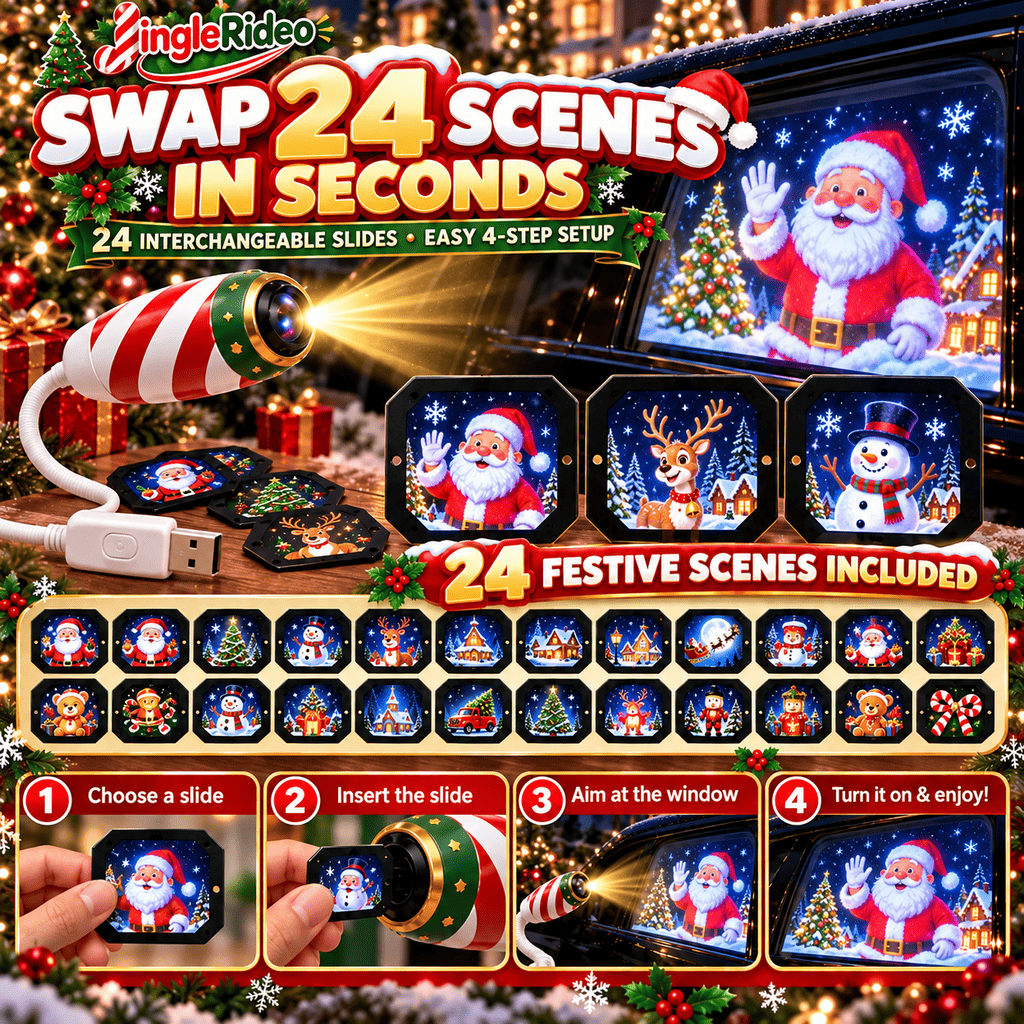
Turn a suitable car window into part of your holiday display. Choose from 24 interchangeable slides, aim the projector, and enjoy a festive scene with a different character whenever you swap the slide.
A LITTLE PROJECTOR. A LOT OF CHRISTMAS.
Your Holiday Display,
With a Playful Twist.
Give your parked car a festive personality. The candy-cane design brings the Christmas look, while interchangeable slides let you choose the scene for the evening.
24 scene choices — a different festive favorite to explore.
USB-A powered — connect a compatible power source.
Swap-in slides — change the illustration by hand.
For cozy driveway evenings, holiday gatherings, and a little extra Christmas cheer.
24 Scene Choices
Explore a variety of Christmas-themed slide designs.
USB-A Connection
Use a compatible USB power source as directed.
Change the Scene
Swap the physical slide to choose another illustration.
01 / A LITTLE CHANGE, A DIFFERENT LOOK
Swap the Slide. Set a New Scene.
Pick a design, insert the slide according to the supplied guide, and position the projector toward a suitable window. Change the illustration by swapping in another slide whenever you want a new look.
02 / GET TO KNOW YOUR PROJECTOR
A USB Connection. A Festive Finish.
The candy-cane-inspired body pairs a front projection lens with a white flexible neck, USB-A plug, and inline power button. Check the supplied instructions for power requirements and placement before setting up your display.
03 / AFTER-DARK ATMOSPHERE
Make the Gathering a Little More Festive.
Add a playful window scene while your car is parked for a holiday get-together. Lower ambient light can help the projection stand out; appearance depends on the window surface, projector position, and surroundings.
![Holiday gathering around a parked car window projection]()
04 / WHICH ONE WILL YOU CHOOSE?
Find Tonight’s Favorite.
Santa, reindeer, and snowman scenes offer a few examples of the Christmas look. Choose a favorite for the evening, then swap the slide whenever you want a change. Explore the collection and make choosing the next scene part of the fun.
05 / YOUR SCENE COLLECTION
One Projector. Twenty-Four Choices.
The set includes one projector and 24 interchangeable scene slides. Keep the slides together between displays so it is easy to find and store your favorites.
![Projector with a display of 24 interchangeable Christmas slides]()
06 / A MOMENT TO CHOOSE TOGETHER
Let Everyone Pick a Favorite.
Make choosing the next scene part of your holiday routine. An adult can handle the projector and setup while everyone helps decide which festive illustration to display next.
07 / THE DETAILS BEHIND THE DISPLAY
A Closer Look Before You Set Up.
The image highlights the front lens and inline power button. Follow the supplied guide for inserting slides, positioning the device, and switching it on. Keep your favorite slides together so your next scene is easy to find.
08 / A FESTIVE GIFT IDEA
For the Christmas-Loving Driver.
For someone who enjoys decorating their parked car for the season, a projector with a choice of slides brings a playful twist to the display. Review the selected option for the exact package contents.
09 / A DIFFERENT LOOK AFTER DARK
Give the Window a Holiday Moment.
From plain glass to a festive illustration, a projected scene adds a visual focal point to your parked-car display. For the clearest display, consider ambient light, projector distance, and a suitable projection surface.
![Illustrated parked car window before and after a Christmas projection]()
Your Setup, Step by Step.
1 / Choose
Select one of the 24 included slides.
2 / Insert
Fit the slide as shown in the supplied instructions.
3 / Position
Aim at a suitable window while the vehicle is parked.
4 / Illuminate
Connect compatible USB power and switch on as directed.
Use as a decorative display while parked. Do not obstruct the driver’s view, vehicle controls, or airbags. Check the guide for window compatibility, power requirements, and any screen or mounting components needed.
Before You Choose.
How many scenes are included?
The described set contains one projector and 24 interchangeable slide scenes.
Does it change scenes automatically?
No automatic scene switching is described. Change the scene by replacing the physical slide.
How is it powered?
The illustrated device has a USB-A connection. Use a power source that meets the product instructions; check whether a power adapter is included in your selected option.
Will it look exactly like the pictures?
Images are styled visualizations. Brightness, clarity, and coverage vary with ambient light, distance, glass, and any required projection surface.
Can I use it while driving?
This description presents it for parked-car decoration. Switch the display off before driving and follow local rules and the product instructions.
YOUR NEXT CHRISTMAS DISPLAY
Choose a Scene.
Bring on the Holiday Spirit.
Head back to the product options and review your 24-scene Christmas projector set.
Choose My 24-Scene Projector ↑
Back to the top to choose your option.